
Radar
Radar watches your entire fan base and highlights who matters right now — so chatters spend their time where the money is.
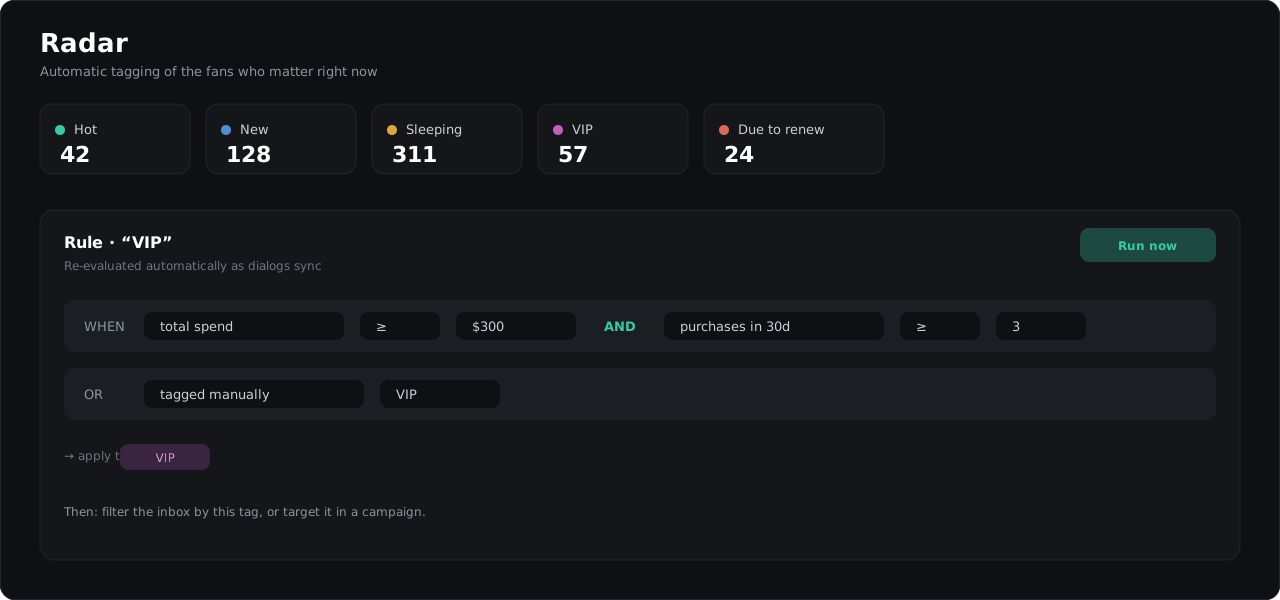
What Radar surfaces
Out of the box, Radar-style tags typically cover:
- New — just arrived, first impression time,
- Hot — active right now, replying fast,
- Sleeping — used to pay or chat, went quiet,
- VIP — top spenders,
- Due to renew — paid access expiring soon.
Rules
Every tag is a rule you control. Rules are built from type-aware conditions — spend amounts, message counts, days since last activity, purchase history, traffic source and more — combined with and/or logic.
Rules re-evaluate automatically as dialogs sync and messages flow, so tags stay current without anyone pressing a button. You can also trigger a full re-run from the Radar page after changing rules.
Using Radar in daily work
- Filter the dialog list by a Radar tag and work it like a queue (all «Sleeping» fans → reactivation script).
- Target a campaign at a Radar segment.
- Watch tag counts on the Radar page as a live pulse of the base.