
Chats & unified inbox
Chats is where your team lives: every dialog from every connected account, in one window.
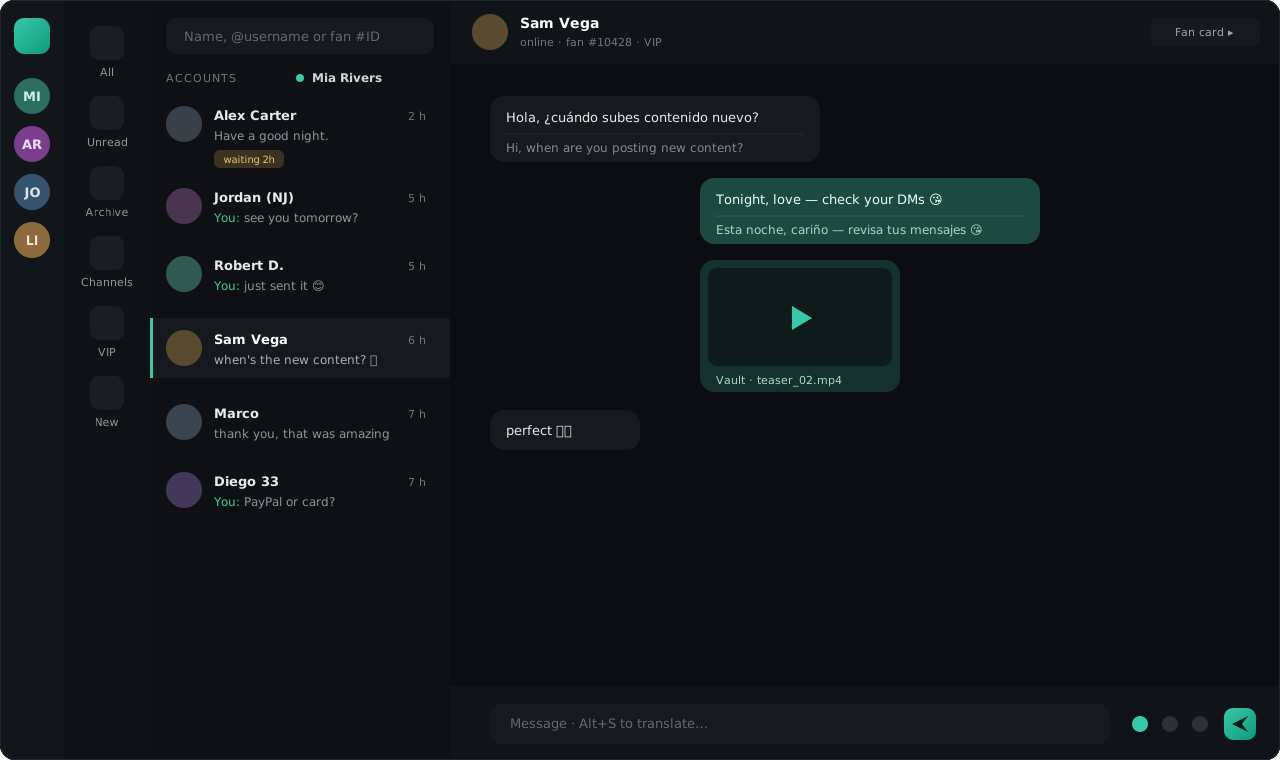
Layout
- Model focus — pick the model you’re working on; the dialog list and content tools scope to it.
- Folders — organize dialogs into folders with unread counters on each chip. Built-in virtual chips: Unread, Archive (synced with Telegram’s archive) and Channels.
- Dialog list — pinned dialogs float to the top (pins are shared across the team), and blocked dialogs are flagged so nobody wastes time writing into the void.
- Fan panel — notes, tags, purchase history, sent content, traffic source and funnel stage for the open dialog.
Writing to fans
Everything Telegram supports, without leaving the CRM:
- Media — photos, videos and albums, straight from the Vault or via drag-and-drop quick upload. Mark any media as a spoiler so it opens blurred.
- Voice & video notes — record or send from the Vault; incoming voice messages are transcribed automatically, translated if the dialog uses the Translator.
- Stickers & GIFs — your sticker packs, recent picks and GIF search.
- Reactions — react with what the fan’s Telegram allows; your frequent reactions are one tap away.
- Quick replies — saved answers for the questions you get every day.
Finding things
- Fan search is typo-tolerant: it forgives misspellings, wrong keyboard layout and transliteration.
- Message search finds any phrase inside a dialog and jumps you to it in context.
Read receipts
An incoming message is marked as read in the CRM the moment you handle it — but the fan only sees «read» in Telegram when a chatter actually views the dialog. Fans never learn their message sat in a queue.
History and accountability
- Message edits and deletions performed anywhere — including from the account’s own devices — remain visible to the owner.
- If a fan deletes the dialog on their side, TelePong keeps your copy and marks what happened.
Group chats beta
Group and forum dialogs are supported in read-and-reply mode; the feature set is expanding.