
Broadcasts & campaigns
Campaigns send a message — text plus any Vault attachments — to a segment of fans across one or several accounts, with limits that keep accounts healthy.
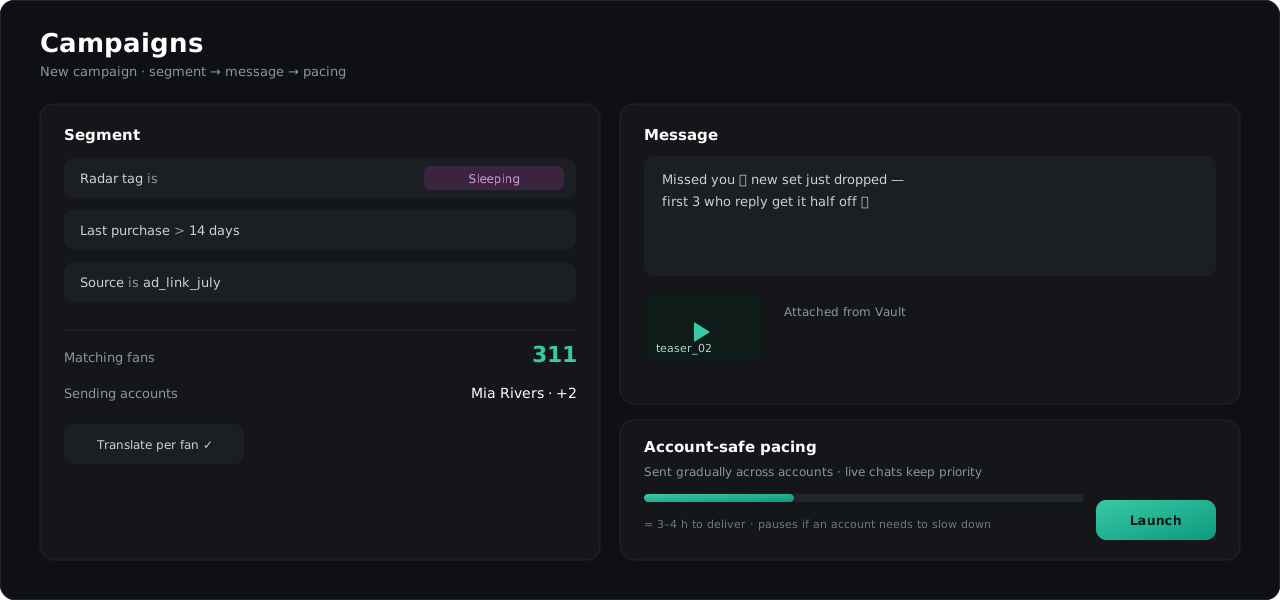
Creating a campaign
- Open Campaigns → New campaign.
- Pick the segment: filter fans by tags, activity, purchases, Radar status or traffic source.
- Choose the accounts that will send.
- Write the message and attach content from the Vault.
- Launch now or schedule.
Sending that protects accounts
TelePong paces campaign sending automatically: messages go out gradually, spread across accounts, and live conversations always take priority over bulk sending. If Telegram asks an account to slow down, TelePong pauses that account’s campaign lane and resumes it later — without touching live chats.
Established dialogs go faster
Fans you already have a real conversation with receive campaign messages without extra throttling.
Per-fan translation
A campaign can translate itself into each fan’s language — one text in, every fan reads it natively. Fans whose dialogs have the Translator configured use their per-dialog settings.
Funnels
Chain campaign steps into a funnel: a fan moves to the next step when they’ve received the content of the previous one — regardless of whether it was sent by a campaign or by a chatter manually. No fan gets the same content twice.
Results
Each campaign reports delivery, replies and revenue attributed to it — see Analytics for how attribution works.